How to play FreeCell Solitaire
FreeCell is the solitaire game where every card is dealt face up, so nothing is left to luck: almost every deal can be won if you plan well. Your goal is to move all 52 cards onto four foundation piles, one for each suit, in order from Ace to King.
The goal
Move all 52 cards to the four foundations, one pile per suit, each built from Ace up to King. Nothing is hidden, so every move can be planned.
Setting up
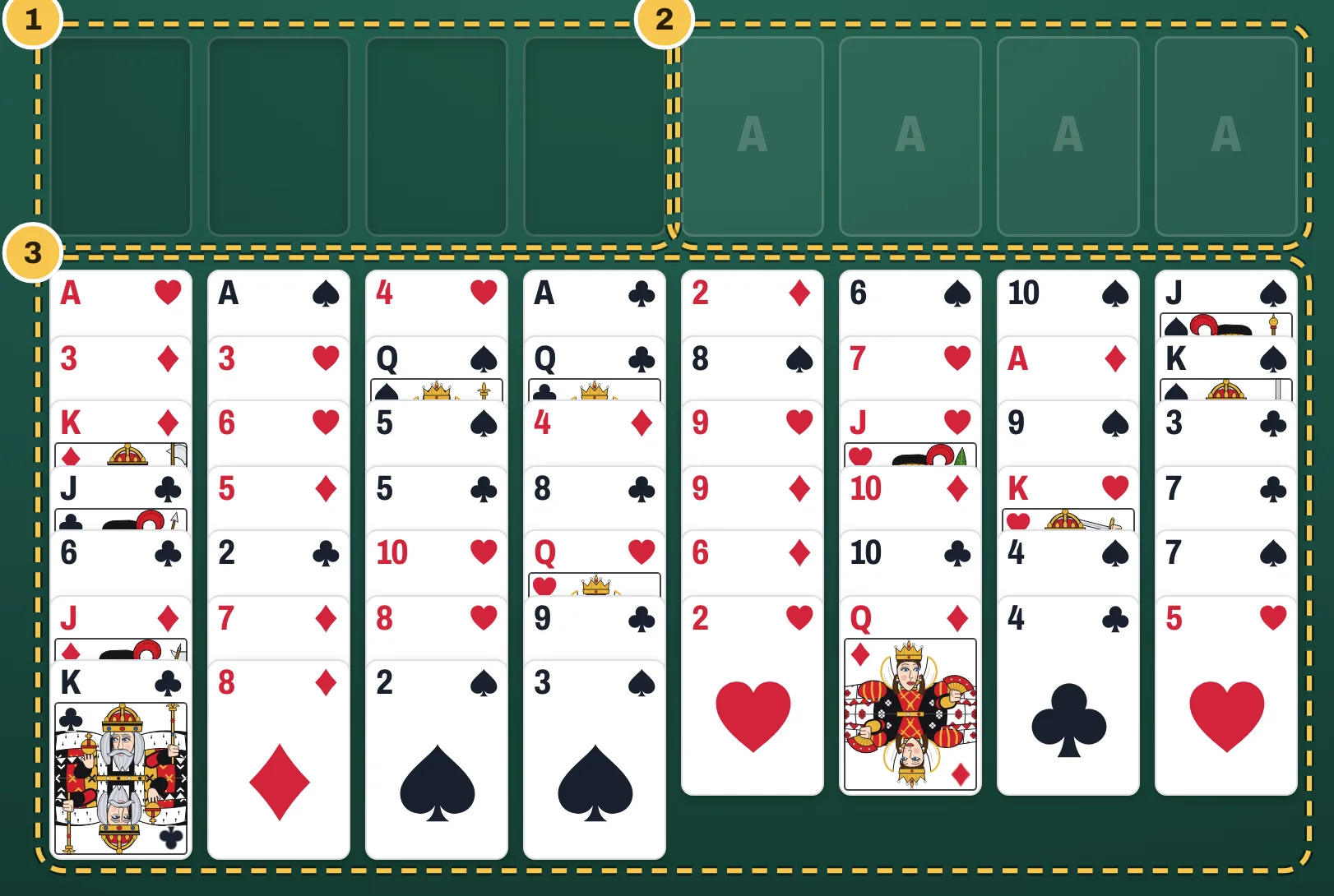
- Eight columns (the tableau). The whole deck is dealt face up: the first four columns get seven cards and the other four get six.
- Four free cells at the top left. Each one holds a single card, any card, for as long as you like.
- Four foundations at the top right, also called home cells. This is where you build each suit from Ace up to King.
How to play, step by step
- Move one card at a time: the top card of any column, or a card from a free cell.
- Park a card in a free cell when it's in the way. Any card can go into an empty free cell.
- Build down in alternating colors. A red 6 goes on a black 7, and a black 6 on a red 7.
- Build the foundations up by suit, starting with the Ace: Ace, 2, 3 and so on to the King. Cards on the foundations stay there.
- Fill empty columns with anything. Any card, or a run, can go into an empty column.
Moving several cards at once
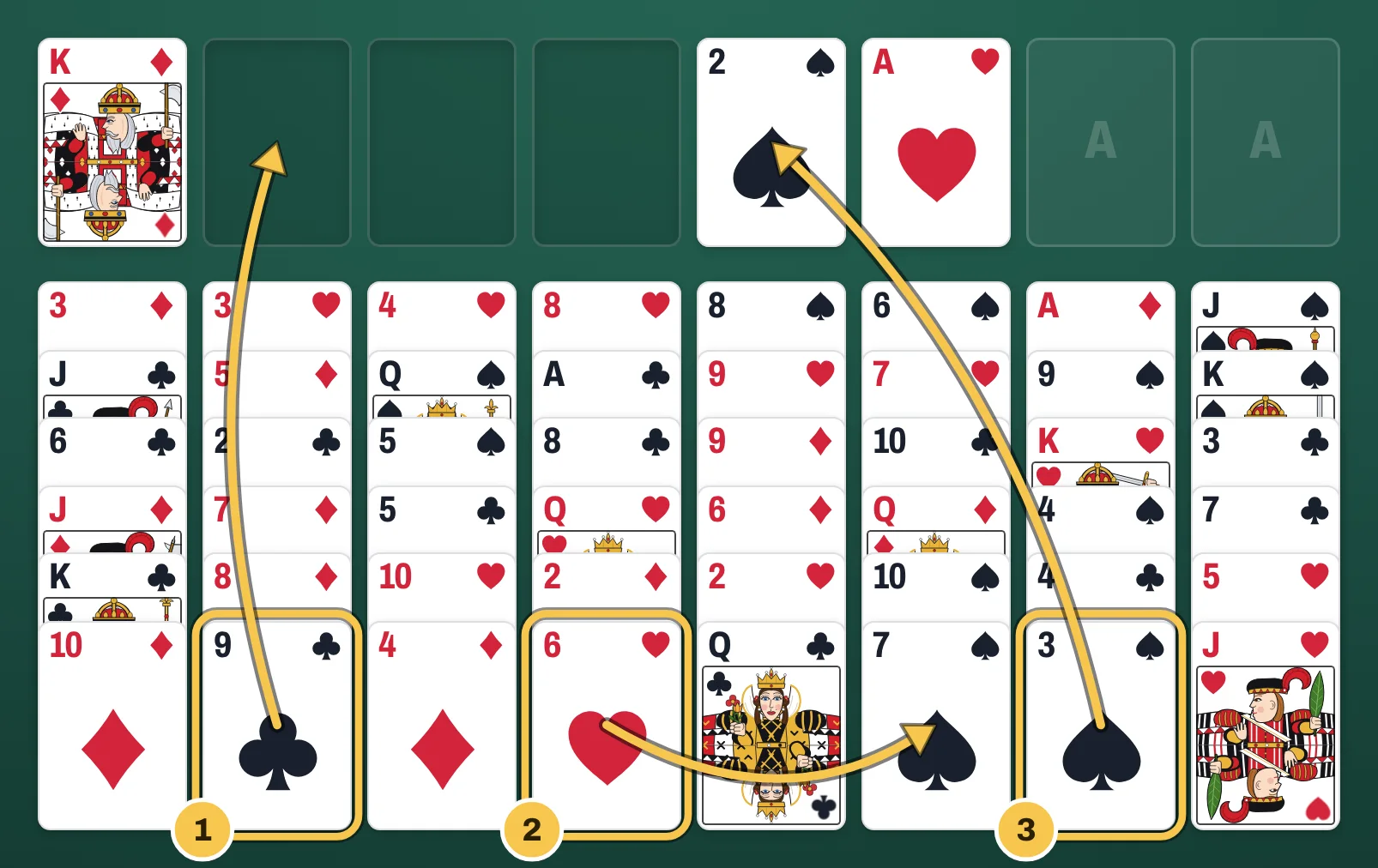
The rules move one card at a time, but you don't have to. A run of cards in order, like a black 9, red 8 and black 7, can move together as long as there would be room to move it card by card through the free cells and empty columns. The game works this out for you: every empty free cell lets you move one more card, and every empty column doubles the number.
| Empty free cells | Empty columns | Cards you can move |
|---|---|---|
| 0 | 0 | 1 |
| 1 | 0 | 2 |
| 2 | 0 | 3 |
| 4 | 0 | 5 |
| 2 | 1 | 6 |
| 4 | 1 | 10 |
When you move a run into an empty column, that column can't also help with the move, so the limit there is half as many. If a run is too long to move, the game tells you how much room you have. More on this: How many cards can you move at once in FreeCell?.
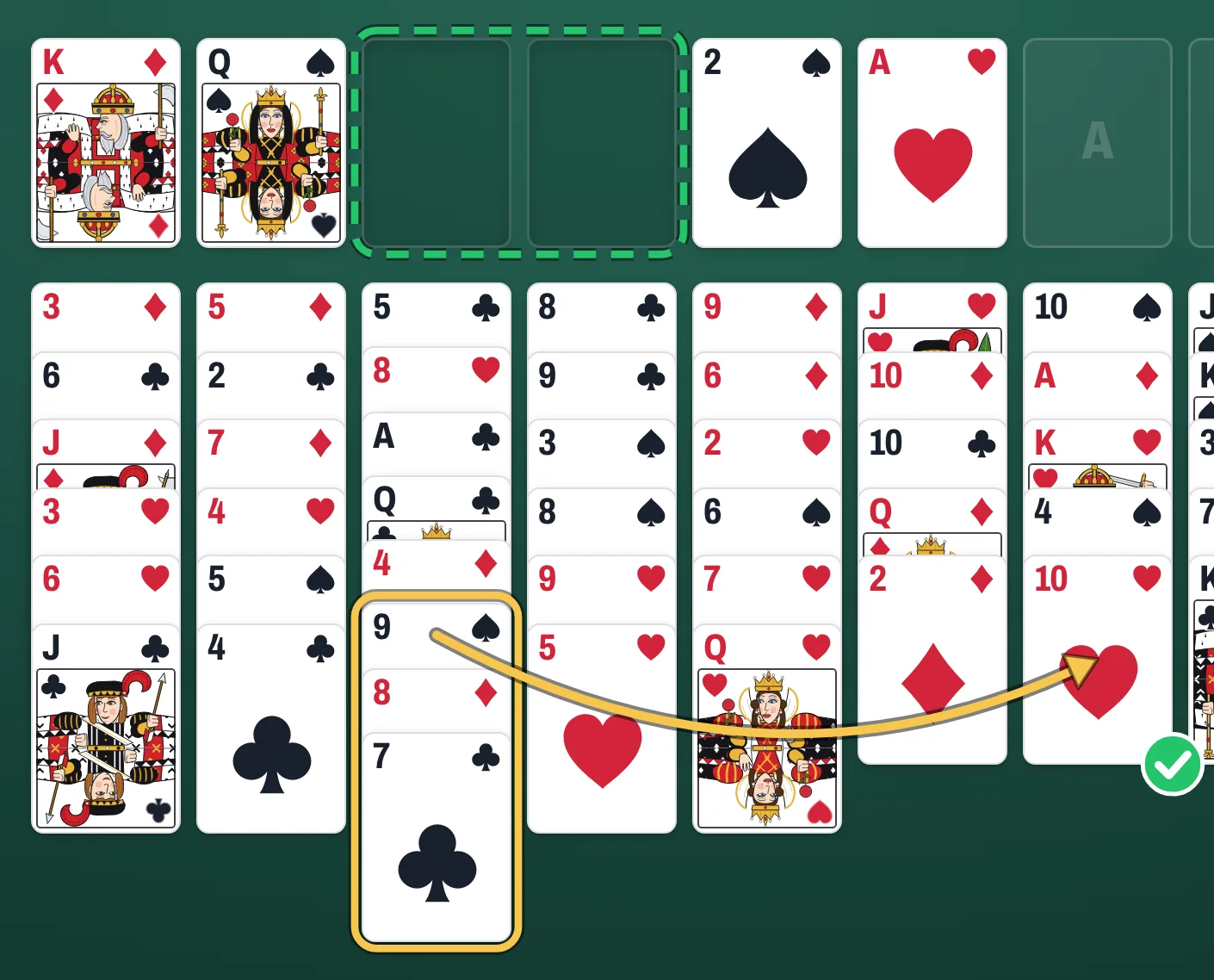
Common mistakes
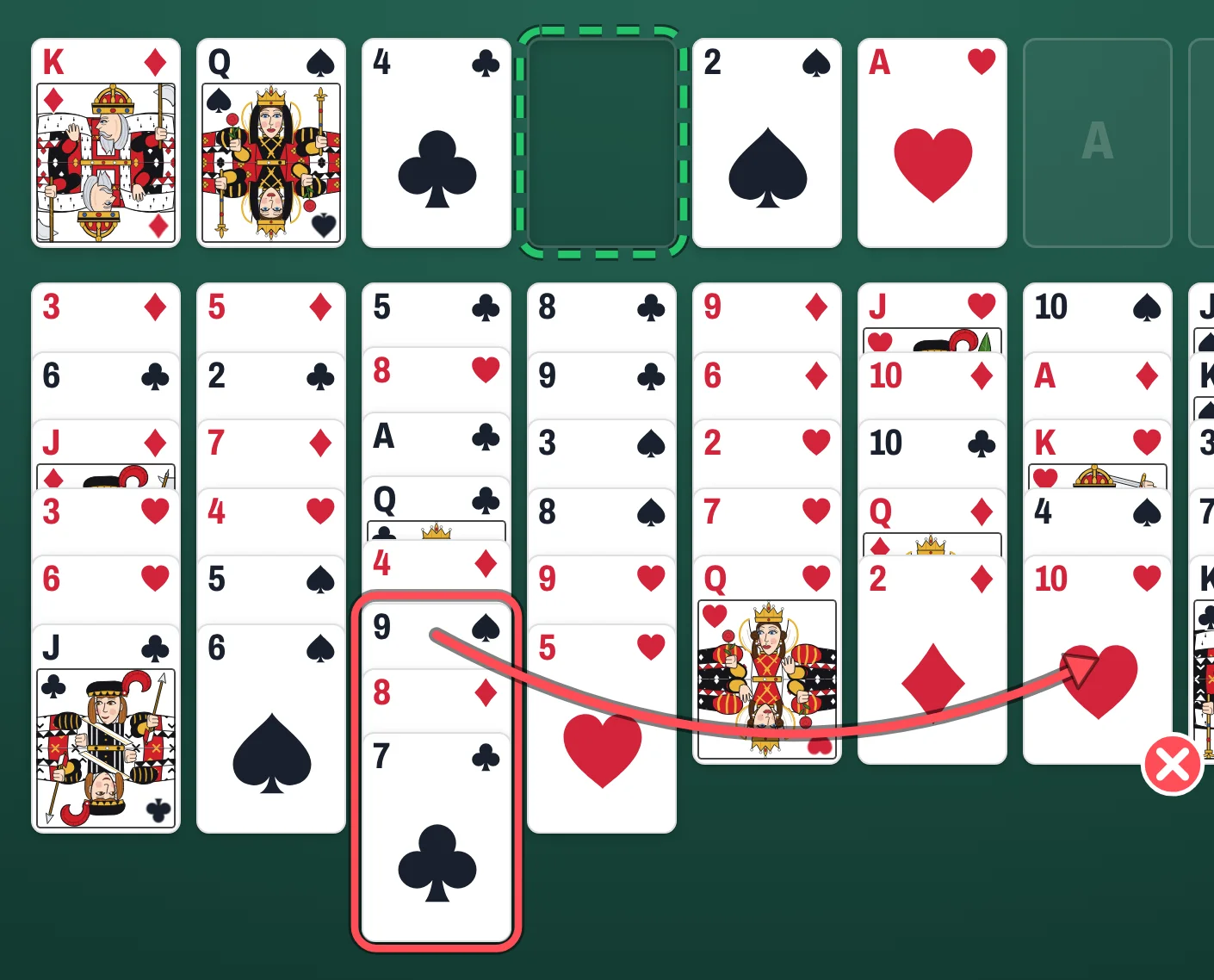
Also not allowed: putting a card on one of the same color (a red 6 on a red 7), or taking a card back down from a foundation. Filling every free cell isn't against the rules, but with no space left you can only move one card at a time, and the game can quickly come to a stop.
How you win
You win when all 52 cards are on the foundations. Near the end, cards often go up by themselves one after another. If you get stuck, the game tells you; undo a few moves, or tap Restart this deal under New to try the same game again.
Cards that go home by themselves
Aces go up to the foundations as soon as they're free, and 2s as soon as their Ace is up. Higher cards follow on their own once nothing in the columns could still need them: the 5 of hearts goes up by itself once the 4 of hearts and both black 4s are on the foundations. You can send any other card up yourself, by dragging it or tapping it.
Numbered games
Every deal has a number from 1 to 1,000,000, and the numbers match the classic FreeCell that came with Windows: game #1 here is the same deal as game #1 there. The number of the game you're playing is at the top of the screen. To play a particular deal, tap New and enter its number, or tap Restart this deal to try the same game again.
Controls
- Drag a card or a run onto a column, a free cell or a foundation. The places it can go light up while you drag.
- Tap or click a card to send it to the best place: a foundation if it fits there, then a column, then a free cell, then an empty column.
- Hint looks ahead for a way to win and shows the next move on it.
- If the game finds that no win is left, it tells you, so you can undo and try another way.
- Undo takes back as many moves as you like.
- Once every column is in order, the rest of the cards go home by themselves.
- On a keyboard, H shows a hint, Ctrl + Z or U undoes a move and N opens the new game options.
Tips for winning more games
- Look before you move. Every card is face up, so you can plan several moves ahead. Find the Aces and 2s first, and work out how to dig them out.
- Keep your free cells empty. Each card you park there makes it harder to move runs. Use the cells as a quick stop, not as storage.
- Treat empty columns as gold. An empty column is worth more than a free cell: it doubles how many cards you can move at once, and it can hold a whole run.
- Build long runs. A column in order can move as a block later, and it often finishes the game by itself.
- Don't rush high cards home. A black 5 still in a column can be a place to put a red 4.
- Think twice before filling an empty column with one low card. A King, or a long run starting with a King, is usually a better fit.
- Use Undo to explore. Try a line of play, and if it goes nowhere, take it back. It costs nothing.
Questions
Can every game be won?
Very nearly. Of the 32,000 deals in the original Windows FreeCell, players have won every one except game #11982, which can't be won. Of the million deals in later versions of Windows, only eight can't be won. Researchers estimate that about 99.999% of all possible deals can be solved. That doesn't make it easy: one careless move can turn a winnable game into a lost one.
Who invented FreeCell?
Paul Alfille wrote the first computer version in 1978, as a medical student at the University of Illinois, for the PLATO educational computer system. Jim Horne later made the version for Microsoft. It first came out in Microsoft Entertainment Pack Volume 2, and it became famous when it was included with Windows 95.
How is FreeCell different from Klondike?
In Klondike most cards start face down and you turn over cards from a stock, so luck plays a big part. In FreeCell every card is face up from the start and there is no stock. Instead you get four free cells to park cards in, which makes it a game of planning.
Is it free? Do I need an account?
Yes, it's free, and you don't need an account or a download. Your current game and your statistics are saved in this browser on this device. A free account is optional: it keeps your games on every device and puts your wins on the leaderboards.
What happens if I close the page?
Your game is saved after every move. Open the page again in the same browser and you'll pick up where you left off.
Can I play offline?
Yes. After your first visit the game works without an internet connection. On a phone, add it to your home screen to open it like an app.